Portable USB Voice Recorder: 8GB vs 32GB Storage Guide
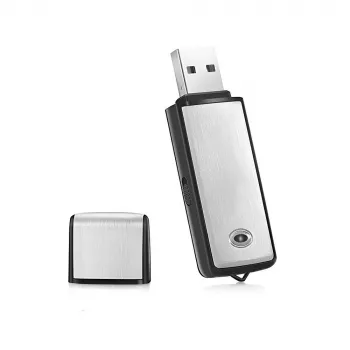
Portable USB Voice Recorder & Digital Audio Sound Recorder with 8GB/32GB Storage
A compact USB voice recorder makes it easier to capture lectures, meetings, interviews, and quick voice notes without juggling extra cables or learning complicated apps. For students and professionals alike, the biggest advantages are speed (start recording quickly), portability (keep it in a pocket or bag), and convenience (transfer files to a computer when you’re ready). Below is what to expect from a small digital audio recorder, how 8GB vs. 32GB storage changes day-to-day use, and practical ways to get clearer audio in real rooms.
What This USB Voice Recorder Is Best For
Small recorders shine when you need a dependable backup to handwritten notes or typed minutes. They’re also useful when you need accuracy—capturing exact wording, deadlines, and action items—without slowing down the conversation.
- Lectures and classes: Capture full sessions and review key parts later.
- Meetings and action items: Keep an accurate record for follow-ups and assignments.
- Interviews: Reduce missed quotes and improve note accuracy.
- Personal memos: Record quick voice notes that can be transferred to a computer.
- Travel and field notes: Lightweight option for recording on the go.
If you’re shopping specifically for a simple, budget-friendly option, the Portable USB Voice Recorder & Digital Audio Sound Recorder with 8GB/32GB Storage is designed around straightforward voice capture and easy file transfer.
Core Features to Look For in a Portable Digital Audio Recorder
Not every small recorder works the same way, so it helps to focus on the features that impact daily reliability rather than extras you may never use.
- USB connectivity: Plug-in transfer for recordings and, on many models, simple charging (device-dependent).
- One-button operation: Faster start when something important happens unexpectedly.
- File management: Predictable naming or time-stamping (when supported) and easy sorting once files are on a computer.
- Playback workflow: Confirm how recordings are reviewed—some users prefer on-device playback, others review on a computer.
- Compatibility: Many USB recorders work smoothly with Windows/macOS as removable storage when supported, which keeps the workflow simple.
If you plan to clean up audio after recording (for example, trimming dead space or boosting speech), a free editor like Audacity can help you review and refine files on your computer.
8GB vs 32GB Storage: What It Means Day to Day
Storage affects how often you have to transfer files and how confident you can feel when recording longer sessions. The actual hours you can store depend heavily on recording quality settings and file format, but the practical difference is simple: 8GB is comfortable for lighter, more routine use, while 32GB is better when your schedule is recording-heavy.
- 8GB: Often enough for occasional meetings, short lectures, and voice notes.
- 32GB: Better for frequent recording, longer interviews, and fewer transfers.
- Quality settings matter: Higher quality uses more space; lower quality fits more hours but can reduce clarity.
- Reduced risk: More storage lowers the chance of running out of space mid-session.
- Good habits win: Regular transfer and archiving keeps any capacity manageable.
| Storage option | Best for | Practical routine |
|---|---|---|
| 8GB | Occasional classes, short meetings, voice memos | Transfer weekly; delete after backing up |
| 32GB | Frequent lectures, long interviews, multi-day use | Transfer monthly; keep a folder per project |
How to Get Clearer Recordings in Real Rooms
Placement and distance usually matter more than any setting. A recorder that’s close to the speaker will often outperform a “better” recorder sitting far away. Use these room-tested tips to improve clarity quickly:
For students pairing audio with stronger written notes, a structured method can make review much faster. Cornell’s guidance on taking lecture notes is a useful framework for combining short written cues with recorded audio for later review.
Transferring, Organizing, and Backing Up Recordings
For general data-protection basics—especially if recordings include names, phone numbers, or private conversations—FTC guidance on keeping your personal information secure is a solid checklist.
Privacy and Legal Notes for Recording Conversations
Product Snapshot: Portable USB Voice Recorder (8GB/32GB)
If you want a straightforward recorder for everyday voice capture, the Portable USB Voice Recorder & Digital Audio Sound Recorder with 8GB/32GB Storage focuses on compact portability and easy transfers. Choose 8GB for lighter use or 32GB if you record frequently and prefer fewer file cleanups.
| Item | Details |
|---|---|
| Product | Portable USB Voice Recorder & Digital Audio Sound Recorder |
| Storage options | 8GB / 32GB |
| Use cases | Lectures, meetings, interviews, voice notes |
| Availability | In stock |
Need video evidence or hands-free incident capture in addition to audio notes? Consider the Ultra HD 4K WiFi Body Camera with Night Vision & Motion Detection for situations where context and visuals matter as much as sound.
FAQ
How many hours can 8GB or 32GB store on a voice recorder?
Recording time depends on the file format and quality settings, so the best estimate comes from testing a typical session length on your preferred setting. As a practical rule, 8GB suits lighter, occasional use, while 32GB is better for frequent or longer recordings with fewer transfers.
How do recordings transfer to a computer with a USB voice recorder?
Most USB recorders transfer by plugging into a computer and copying files over like you would from a removable drive (when supported). After copying, rename and organize files, then back them up to a second location before deleting anything from the device.
Can this type of recorder be used for lectures and meetings?
Yes—compact voice recorders are commonly used for both, as long as you place them close enough to capture clear speech. For best results, keep the recorder near the speaker or centered on a meeting table, and always follow local consent rules and any school or workplace policies.










Leave a comment